Key changes
See at a glance how the updated experience makes products easier to find and explore.
See at a glance how the updated experience makes products easier to find and explore.
1: Overview
The new Overview tab gives institutional users a visual, at-a-glance way to browse the mutual fund lineup before moving into detailed data.
2: Search
A faster path to find products using key identifiers: name, fund number, ticker symbol or CUSIP.
3: Filters
Find filters next to product details on larger screens and in a menu on smaller screens for quicker access.
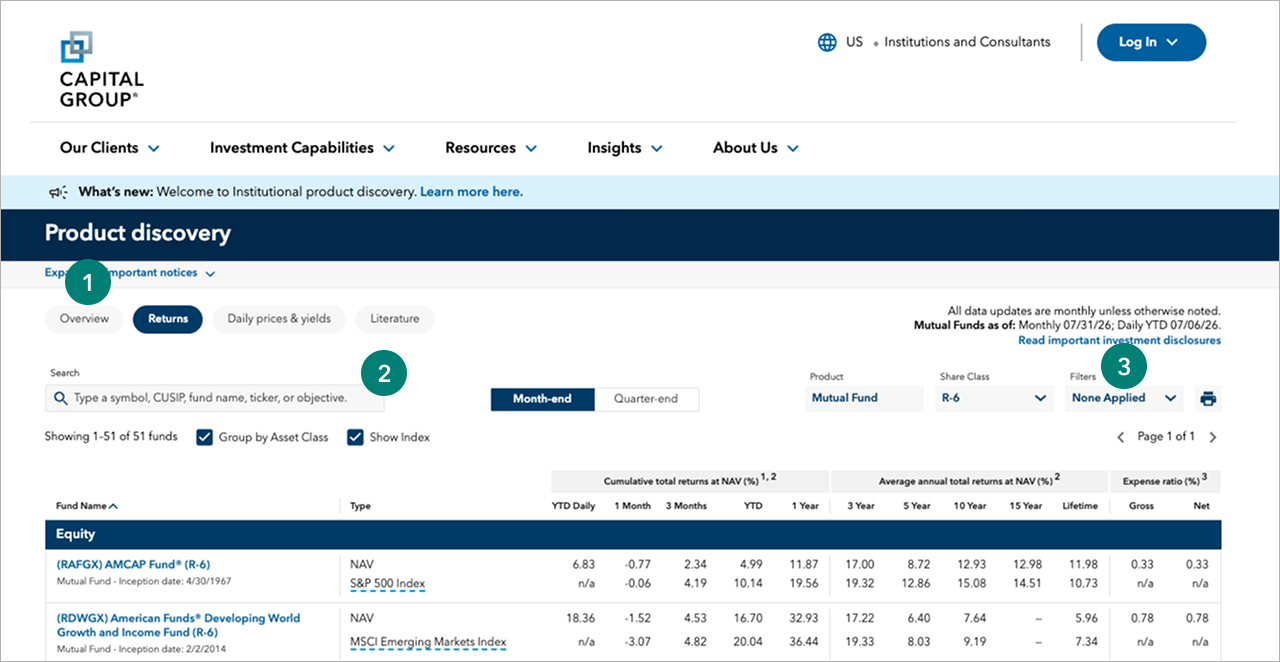
For illustrative purposes only.
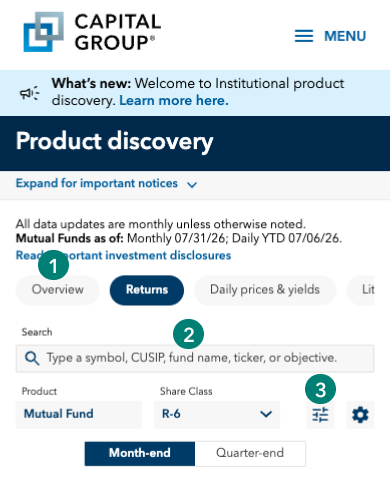
See at a glance how the updated experience makes products easier to find and explore.
1: Overview
The new Overview tab gives institutional users a visual, at-a-glance way to browse the mutual fund lineup before moving into detailed data.
2: Search
A faster path to find products using key identifiers: name, fund number, ticker symbol or CUSIP.
3: Filters
Tap the gear icon to display advanced filtering options on your mobile screen.
Why is Capital Group updating the institutional investment products experience?
The update brings key product information and tools together, making products easier to find and explore.
What is changing?
The updated experience features a new design, easier access to filters, expanded product search and a new Overview tab. These changes help you find product information faster.
Which products are included?
The updated experience includes institutional mutual funds.
Are product details or data changing?
No. You’ll still have access to all currently available data.
Will my bookmarks or saved links still work?
Yes. Existing bookmarks will continue to work. We recommend updating them after you visit the updated experience.
Can I continue using the current experience?
No. The current experience will retire when the updated experience launches.
Has product information moved?
Some information has moved to make it easier to find. The Overview tab now brings key product and share class details together.
How does search improve the experience?
Search helps you find products faster by name, fund number, ticker symbol or CUSIP.
What is changing with filters?
Filters are moving to easier-to-find locations, helping you narrow products faster. You’ll also find a wider range of facets to filter, including region, share class, Morningstar category and eVestment asset class.
How do search and filters work together?
Use search to find a specific product. Use filters to narrow a broader product list. Together, they help you reach the right offerings faster.