July 6, 2026
Easily update your third-party administrator (TPA) contacts in Plan manager
Today, many TPAs use our Plan manager tool to help get their clients’ retirement plans set up quickly and efficiently. When contact information needs to change or you spot an error, the online platform now makes updates easy to manage.
New capabilities allow you to update existing contact information without having to completely initiate a new plan. You can also add additional contacts from your TPA firm. Once added, those individuals can access the plan through the landing page.
Here’s how it works
Let’s say a financial professional (FP) initially entered a TPA salesperson from your firm as the contact for a plan. Later, you realize that they should have listed your TPA implementation contact instead. Plan manager now enables you to update that information in a snap, allowing post-submission documents to be routed to the correct contact.
Below is a step-by-step process for updating contact information:
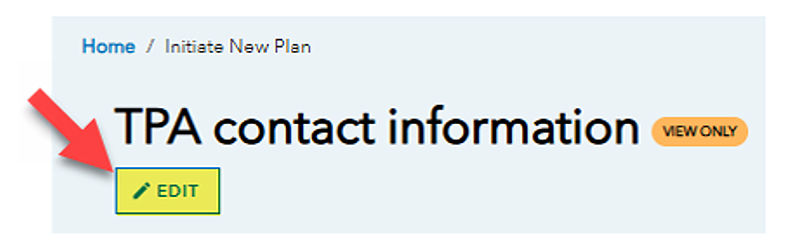
Any contact tied to the request can update TPA contacts by selecting EDIT from the landing page or from within the TPA contact sections:

1. You can add up to three TPA contacts to a plan. From the TPA section, selecting “Add another contact” will allow you to search for another individual from your firm to add to the plan. Any added contact will have access to the plan when they check their individual landing page. As always, any contact within the same firm can then access/edit plans from the My plan requests tab on the landing page.
2. A primary TPA contact can remove themselves from an existing request and assign a different primary contact for the plan.
3. You can adjust roles and responsibilities in the contact card display by prescribing access preferences with the toggles.
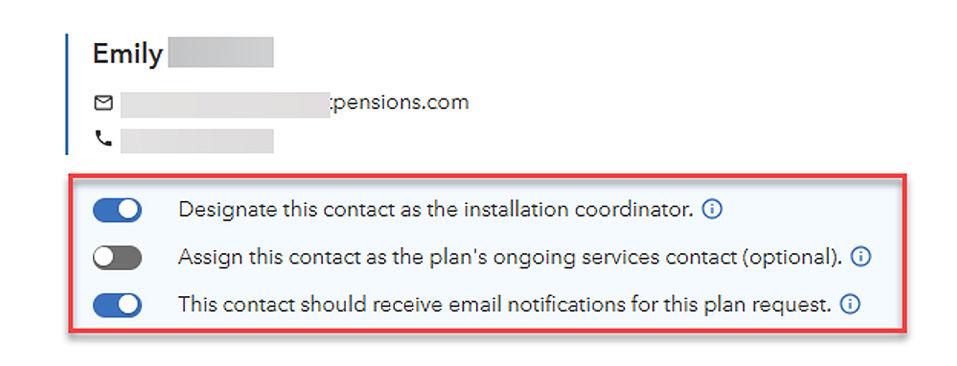
4. Notification/reminders about the plan request will be sent to all FP/TPA contacts that opted in for notification.
5. Docusign emails will be sent to all the FP/TPA contacts that opted in for notification. These will continue to be sent as CCs.
Want to learn more about Plan manager? Log into your TPA account and search for Plan manager.
Have questions? Please call us at (888) 777-1579.